Changing Text Properties to Lists in Obsidian
Gripes with the Text Property Type
Obsidian’s Properties feature along with Dataview are things I use all the time to create little mini-databases within my Vault to keep track of things ranging from cocktail recipes, films, quotes, and for this particular project/post, poems (:
When I originally started keeping track of my favorite poems, my template looked something like the following:
---
author: # Text, usually a link to another file in a "Poets" folder
emotions: # Also Text, just a string with: word, word, word structure
---

## Remarks

## Context
The reason for keeping emotions property as text-only was because I wasn’t the biggest fan of how Dataview renders the list type, with each entry of the list on its own line as opposed to some option where I could have one line (perhaps comma delimited?) that wraps around in a cell:
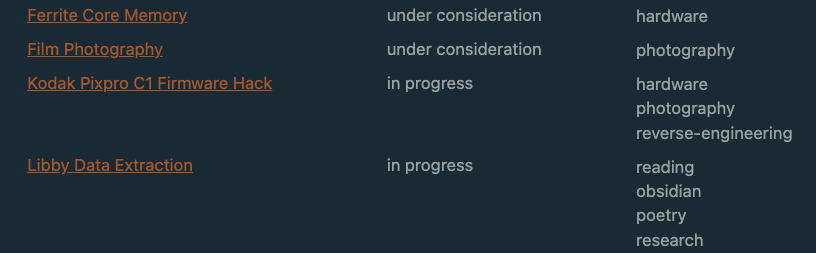
This is from my “Thread DB” which I use to keep track of separate logs for projects. The rightmost column shows how Dataview renders the list type in a table
However, as I added more and more poems with varying combinations of emotions I came to realize the Obsidian UI would try to suggest previous whole entries as inputs, which looked silly and felt obnoxious to me. If I tried to start by typing something like “nature” it would recommend some other distant entry where I might have typed “nature, love, hope”. If I did NOT want that whole entry then I would have to work around it by hitting the Escape key and being cautious with the autocomplete which might spring up again.
Since I’ve already gone through with the changes to my Poem templates, the closest thing I have in my vault to quickly display this annoyance is my Cocktail recipes template. Note how if I wanted to just type in something like “sweet” I end up getting suggested a bunch of other stuff I don’t want.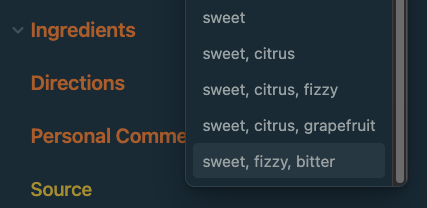
With more experimentation I realized having a property as a list type gave much more control over the suggested strings and semantically felt more “in-line” with what one would expect when you have multiple distinct descriptors for something. Thus it made more sense to me to update the template to use a list type instead for the property.
That being said though, I needed some way to update all the pre-existing poems to fall in line with this new type structure! While I was fortunate enough that all the strings were just words separated by commas, there didn’t seem to be a tool that could automatically do the conversion of turning each word into a list entry and then using that list to replace the old text property.
The closest thing I could find was technohikers’ Multi-Properties Plugin which I’ve used when I need to add a tag retroactively to notes but doesn’t seem to have the ability to convert existing entries in one type to another.
Considering Obsidian stores all your data as markdown files however, it felt like it wouldn’t be too daunting a task to hack something together to do this myself, leading to the creation of the Python snippet you see in this post (: 2
Initial Attempt
I initially thought of the following approach:
- Get all the relevant .md files in the Poems folder
- Regex for the starting and ending "---" in the files denoting the property section
- Extract the "emotions: ...." part of the regex
- Use some string manipulation to convert the string into a new string with the proper "-" and "\n" characters injected to be put into a list
- rewrite over the old file with the new entry
At some point though I caught myself and asked if there was an existing library that could simplify some of this, particularly steps 2 through 4. Lo and behold, I discovered Python Frontmatter by Chris Amico which automatically latches onto the section of the markdown file that has the properties and gives a pretty nice interface to read and manipulate that data. While it isn’t advertised for use with Obsidian, properties are just embedded YAML and with some play scripts3 I figured out it pretty much did what I wanted.
Result
The final version of what I wanted to do ended up looking like the following. Note that I had to add some additional logic and compromise on my initial idea of overwriting things in place.
Path Strings
I used Mac OS to develop this so if you're a Windows user you'll probably need to change the slashes to backslashes.
# Set up paths
=
=
= + +
= + + +
=
=
=
# Create a new folder to hold the modified files
continue
=
# get the property of interest and do some simple string maniuplation.
# The frontmatter library lets me just plug in a list of strings
# and handles conversion to text automatically!
=
=
=
# Write the modified file to the temporary directory
To better explain things I’ve generated a diagram of the file structure with Nathan Friend’s tree.nathanfriend.com tool:
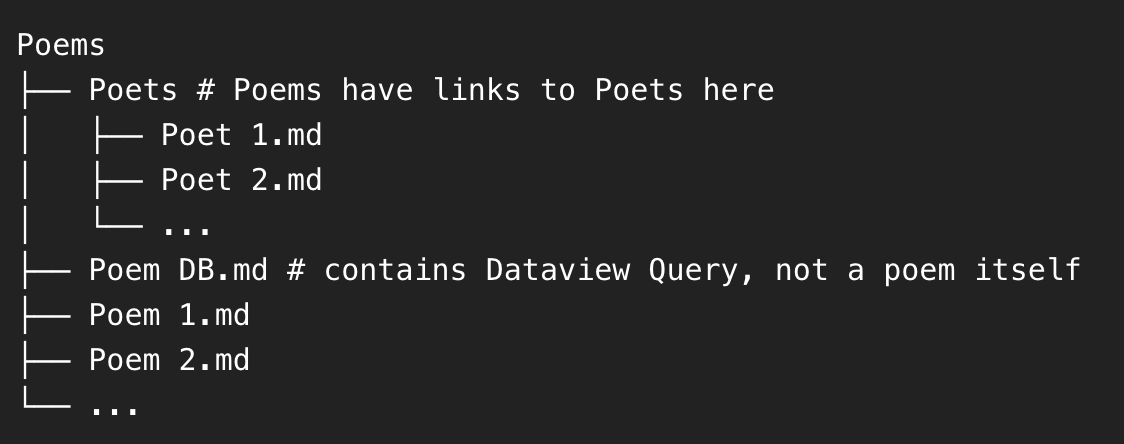
I only want to touch the Poem <int>.md files, the Poets folder should be skipped along with the Poem DB.
My original idea of rewriting a file in place would have required some reworking I wasn’t the biggest fan so I just opted for the safer option of creating a temporary directory to store all the markdown files with the modified property. The added benefit to this (besides being safer!) is that I can double check things have been correctly done via either a simple diff check or literally just copying in the Poem DB.md dataview query and modifying it a little to target the temporary folder.
The query in question is super simple, just the following:
TABLE author, emotions
FROM "Poems" AND !"Poems/Poets"
WHERE file != this.file
Once I was happy with everything, I just use mv from the command line to copy everything in and overwrite the old stuff.
Room for Improvement
It’s definitely not the most polished thing in the world but this is one of those things where I’m probably only going to use this snippet once or twice to reformat some existing files and call it a day.
I think this could make for a neat little CLI tool or Obsidian plugin itself and I’m acutely aware this definitely isn’t the most memory friendly (after all, you load the entire file just to modify the metadata and then spit out a copy somewhere else!). With the path handling it probably would have been wiser to use pathlib instead of the more fragile string manipulation I'm doing.
A very minor gripe that I also ran into but didn’t feel was worth fixing because it doesn’t seem to impact anything functionality-wise is that Obsidian has list properties represented like this
list_property:
  - thing
  - another thing
But the output from the python frontmatter library just does the following:
list_property:
- thing
- another thing
note the absence of preceding spaces! I did try a native python string substitution approach on the output of the .dumps from frontmatter but you latch onto the “---” which would have required some additional regex-fu on my end. Very pedantic of me but would have reduced some anxiety while hacking away at this.
That being said, I’m pretty happy with what I was able to piece together with a chunk of my weekend and the fact I can even do something like this with my notes is just a reminder to me of how much I love the hackable nature of Obsidian ❤️
If you'd like to leave a comment or have a suggestion/concern, please feel free to reach out to me via my e-mail at: (my first name)z(first letter of my last name).dev@gmail.com
As you can tell, I do not have the most descriptive palate but these keywords suffice when I’m deciding what I’d like to have on an evening from how I usually think of cocktail flavors (:
I briefly thought about forcing myself to cook something up with sed/awk because I wanted to get more familiar with those tools but felt it just wasn’t worth the time considering I wanted something in say, an hour or so as a nice weekend project.
Essentially throw-away code to confirm an approach I’m thinking of works on a smaller scale.